
How SmartSupplySystem Works
From digital identity to automated settlement — see how every consumable is authenticated, tracked, and settled without changing a single piece of hardware.
Digital Twins: A Living Record for Every Consumable
Every ink cartridge, media roll, and replacement part gets a unique verified identity — a digital twin that travels with the physical product from manufacture through consumption and beyond.
This is not a tracking number. It is a living digital record that serves authentication, automation, compliance, and revenue model enforcement simultaneously. When a consumable is manufactured, its twin is created with a full product definition: quality specifications, viscosity data, shelf life, surface compatibility, and safety data references. From that moment forward, every event in the consumable's life is recorded.
At distribution, chain of custody events and authorized channel verification are added. At the print shop, an operator scans a QR code on the label — no firmware changes, no new hardware — and the twin is verified against its tamper-proof record. During consumption, usage data and settlement triggers are captured automatically. Even post-consumption, recycling events and take-back records are maintained for end-of-life reporting.
The twin also carries Digital Product Passport metadata from the moment of creation — materials composition, circularity data, and item-level traceability that satisfies EU ESPR requirements. Every consumable's unique Vault ID and QR code serves as the universal identifier that DPP regulations require.
A consumable's digital twin grows richer at every stage — from manufacture through consumption and recycling.
Verified consumption data means brand protection and warranty enforcement are built into every consumable interaction — not bolted on after the fact.
DPP-ready data collection begins at manufacture and accumulates automatically. Item-level traceability is inherent, not retrofitted.
Provenance proof and limited-edition control through the digital twin. Every unit's authenticity is independently verifiable.
The MCP Toolset: AI-Powered Product Management
Managing hundreds of consumable definitions manually is impractical. The Model Context Protocol (MCP) makes it possible for AI assistants to interact directly with SmartSupplySystem's tools — turning complex data operations into natural-language conversations.
MCP is an open protocol that lets AI assistants use structured tools. In the context of industrial printing, this means an operator or product manager can describe what they need in plain language, and the AI handles the technical execution — creating product definitions, producing labels, querying inventory, or building settlement reports.
The most visible application is the Definition Compiler. Printer consumables come with dense Technical Data Sheets — PDFs full of viscosity curves, substrate compatibility tables, and shelf-life specifications. The Definition Compiler transforms these unstructured documents into clean, machine-readable product definitions ready for digital twin creation. What once required hours of manual data entry now takes minutes.
But MCP extends far beyond the compiler. The same protocol enables AI-assisted interaction with the entire module stack: creating and managing consumable projects, producing label PDFs with QR codes, checking onboarding status, reviewing job history, and querying settlement data. For RIP and DFE vendors, MCP offers an integration model based on open standards — their systems interact through AI-assisted tooling, not custom APIs.
The Model Context Protocol is an open specification — full technical documentation is available in the Developer section.
MCP Interaction Flow
AI assistants interact with SmartSupplySystem modules through the Model Context Protocol, enabling natural-language operations across the entire platform.
{
  "tool": "definition_compiler",
  "arguments": {
    "source": "tds_document.pdf",
    "product_type": "uv_ink",
    "output_format": "product_definition"
  }
}#include "ConsumableControl.h"
// Load and verify a consumable
auto result = CC_GetBalances(walletAddress);
if (result.authenticated) {
auto job = CC_CreateJob(projectId, consumableId);
// Settlement handled automatically
}Before & After: The Definition Compiler
The Definition Compiler transforms unstructured technical data sheets into structured, ledger-ready product definitions.
Scale product definition across hundreds of SKUs without manual data entry. AI-assisted creation makes onboarding practical at any volume.
MCP is the integration model — your systems interact with SmartSupplySystem through standardized tooling, not proprietary APIs. Full technical docs in the Developer section.
No new interfaces to learn. Interact with the system through natural language — check inventory, review jobs, or query settlement status by asking.
Transaction Lifecycle: From Scan to Settlement
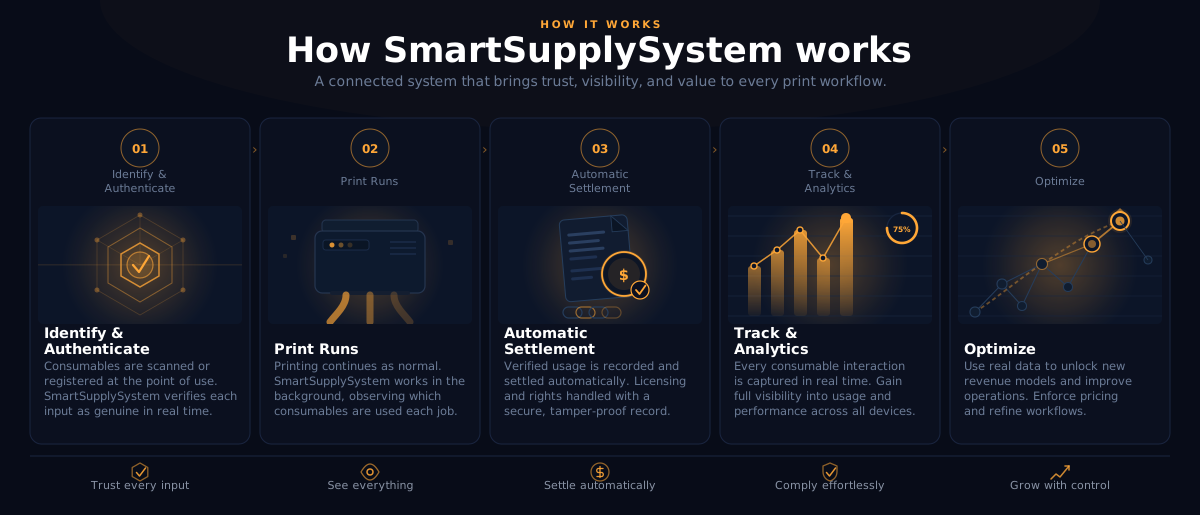
Once a consumable has a digital twin and is onboarded at a print shop, every job follows a five-stage lifecycle — from initial verification through automated settlement and analytics. The operator's workflow does not change. Authentication, costing, and settlement happen in the background.
The entire lifecycle is designed around a single principle: fire and forget. Operators scan a QR code to onboard a consumable, then work as they always have. The system handles verification, tracks usage, settles transactions, and updates analytics automatically. No specialized knowledge required — a transaction sponsor constructs and pays for all ledger operations on the operator's behalf.
Settlement works through verified unit transfer. When a consumable is used in a print job, its authenticated units are settled from the vault with an immutable digital ledger record. If the job involves IP-licensed content or premium features, those are settled in the same transaction.
This same infrastructure supports multiple revenue models. One-time consumable authentication, per-print licensing, feature gating, and subscription-based access all use the same settlement mechanism. OEMs choose the model — SmartSupplySystem enforces it at the transaction level, not through firmware locks or DRM.
Consumable Loaded
Operator scans QR code on the consumable label. The digital twin is verified against your Supply Vault. Inventory updates automatically and compatibility is checked against the installed printer and media.
Job Initiated
The printer or RIP verifies authentication status and checks for any IP or license requirements. Press gating decisions are made automatically — verified consumables proceed, unverified ones are flagged.
Print Executes
The print job runs normally. Job costing is initiated automatically from the authenticated consumable data and any applicable license requirements. No operator intervention needed.
Settlement
Authenticated units are settled from the vault with an immutable digital ledger record. IP and license fees are settled in the same atomic transaction.
Analytics & Insights
Settlement data flows into real-time dashboards. Activation-to-usage-to-close chains are completed. Gray market detection signals are processed. Predictive restocking triggers are evaluated.
See this live →Consumable Loaded
Operator scans QR code on the consumable label. The digital twin is verified against your Supply Vault. Inventory updates automatically and compatibility is checked against the installed printer and media.
Job Initiated
The printer or RIP verifies authentication status and checks for any IP or license requirements. Press gating decisions are made automatically — verified consumables proceed, unverified ones are flagged.
Print Executes
The print job runs normally. Job costing is initiated automatically from the authenticated consumable data and any applicable license requirements. No operator intervention needed.
Settlement
Authenticated units are settled from the vault with an immutable digital ledger record. IP and license fees are settled in the same atomic transaction.
Analytics & Insights
Settlement data flows into real-time dashboards. Activation-to-usage-to-close chains are completed. Gray market detection signals are processed. Predictive restocking triggers are evaluated.
See this live →Usage-based pricing, feature gating, and warranty enforcement — all automated through the settlement layer. Choose the revenue model; the platform enforces it.
Per-unit revenue tracking and anti-overrun guarantees for limited editions. Direct visibility into channel performance without relying on distributor reports.
Limited-edition control with batch-level authentication. Encrypted artwork with per-unit decryption ensures that premium content stays premium.
Monitor: Your AI Watches Your Supply Chain
Once your products and printers are registered, every transaction flows back through the blockchain into a live event stream. Your AI has access to all of this data through the same connection you used to create your projects.
There is no separate login, no separate dashboard, no new tool to learn. Your AI combines your project definitions, vault attribution, and live transaction history to give you intelligent, contextual answers. The supply chain intelligence layer updates approximately every 15 minutes — fresh enough to catch problems before they matter, stable enough that numbers do not move underneath you mid-conversation.
Every product token, every consumption event, every Service Agreement breach and trust decrement lands in your organization's scoped event stream. Your AI queries that stream on demand. Ask a question, get an answer. Drill deeper, get more detail. The conversation is the interface.
Because the public wallet address printed on every bottle label and every printer is the universal lookup key, you can bring a physical product back to the digital record at any time. Scan the code, read the address to your AI, and get the full history — where it was sold, how it was consumed, every event it participated in.
Example questions you can ask
Your products in the field, visible from your AI client. Consumption velocity, depletion forecasts, and device trust standing — all scoped to your organization, always queryable.
Out-of-region bottle detection, counterfeit events, and printer anomalies surface as soon as they flow through the vault. Act on intelligence, not on dashboards you forgot to open.
Compare consumption patterns across Americas, LATAM, EMEA, and APAC channels. Catch bottles showing up outside the region they were sold into, before the pattern becomes a problem.
See Supply Chain Intelligence In Action
These are real AI conversations against a live simulation dataset — a fictional OEM (SouthMill Print) running four regional vaults (Americas, LATAM, EMEA, APAC) across 90 days of consumption activity. No dashboards. No charts. Just questions and answers.
Analytics refresh approximately every 15 minutes. All examples below are from the SouthMill Print simulation and do not represent any real customer.
Watch it happen: the recorded session
A real AI assistant answers six supply-chain questions live — every number graded automatically against the database. 2:52, narrated.
How's my supply chain?
Portfolio overview across all vaults
get_portfolio_summaryWhen will my Black ink run out?
Depletion forecast for a specific product
get_project_statusWhich printers are showing anomalies?
Service Agreement trust standing
get_project_statusWhat happened at my LATAM channel last month?
Out-of-region bottle detection
get_lifecycle_eventsThese conversations happen through the same MCP connection you use to create projects. Connect your AI client, and your supply chain intelligence is one question away.
Connect Your AI and Try ItSee It in Action
The best way to understand SmartSupplySystem is to watch it work. Explore a live demonstration of the full transaction lifecycle — from consumable authentication through automated settlement.